Building a web scraping bot on Google Cloud that sends notifications
I had the chance to join the G.I.G program at my company. As a learning exercise, I built a bot on Google Cloud that regularly scrapes the web and sends results to Slack.
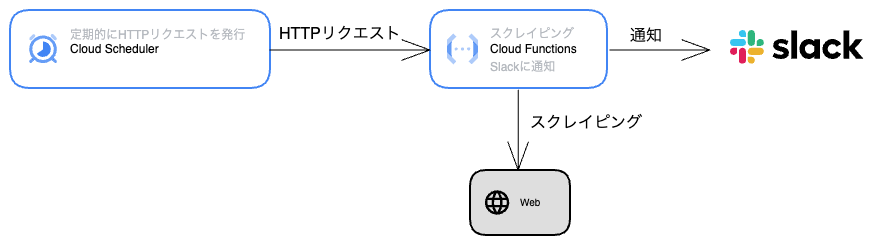
Overall architecture
A Cloud Functions HTTP function runs the scraping and sends the results to Slack. A Cloud Scheduler job sends regular HTTP requests to the Cloud Functions function, which creates the bot.
Implement the scraping
First, implement the code that runs the scraping locally.
I use axios and cheerio to fetch and parse HTML.
const cheerio = require('cheerio');
const axios = require('axios');

const scrape = async () => {
  const res = await axios.get(
    'https://xxxx/xxxx'
  );
  const $ = cheerio.load(res.data);

  // (omitted)

  return 'Scraping result';
};

const main = async () => {
  const result = await scrape();
  console.log(result);
}

main();
Implement the Slack notification
Next, implement the part that sends the scraping result to Slack.
To send messages to Slack, generate a Webhook URL using Incoming Webhook and send a POST request.
const notifyToSlack = (message) => {
  return axios.post(
    "https://hooks.slack.com/services/xxxxx/xxxxxx/xxxxx",
    {
      text: message,
    }
  );
}

const main = async () => {
  const result = await scrape();
  notifyToSlack(result);
}

main();
Install the Google Cloud CLI
Before setting up Google Cloud, install the CLI tool for terminal operations.
I install it with Homebrew here, but any method works.
$ brew install --cask google-cloud-sdkLogin to authenticate so you can use the gcloud command to operate Google Cloud.
$ gcloud auth loginCreate a project
Create a project in Google Cloud to build the services.
Implement the Cloud Functions HTTP handler
Now build the application on Google Cloud.
For details on Cloud Functions, see the official guide.
To run a function in Cloud Functions, you need to register an HTTP request handler function using the Functions Framework for Node.js.
First, install @google-cloud/functions-framework.
$ yarn add @google-cloud/functions-frameworkThen register the scraping and notification logic as an HTTP handler function.
const functions = require("@google-cloud/functions-framework");
const cheerio = require("cheerio");

functions.http("checkReservation", async (_req, res) => {
  const result = await scrape();
  await notifyToSlack(result);
  res.send("ok");
});

// (omitted)
Before deploying, start a test server locally to check that the function runs.
{
  "scripts": {
    "start": "functions-framework --target=checkReservation"
  }
}
$ yarn start
Serving function...
Function: checkReservation
Signature type: http
URL: http://localhost:8080/Send an HTTP request and confirm that a message is sent to Slack.
# Run in another tab
$ curl http://localhost:8080/checkReservation
ok
Deploy to Cloud Functions
See Deploying Cloud Functions in the official guide for details.
Run the gcloud functions deploy command to deploy the function.
$ gcloud functions deploy YOUR_FUNCTION_NAME \
[--gen2] \
--region=YOUR_REGION \
--runtime=YOUR_RUNTIME \
--source=YOUR_SOURCE_LOCATION \
--entry-point=YOUR_CODE_ENTRYPOINT \
TRIGGER_FLAGS
Since I want to trigger via HTTP request, I created this deploy command:
--gen2specifies deploying to 2nd generation Cloud Functions--trigger-httptriggers the function on HTTP requests--allow-unauthenticatedallows calling the function without authentication. Cloud Functions requires authentication by default, so this flag is needed.
$ gcloud functions deploy reservation-notify \
  --gen2
  --region=asia-northeast1 \
  --runtime=nodejs16 \
  --source=. \
  --entry-point=checkReservation \
  --trigger-http \
  --allow-unauthenticated \
  --project=reservation-notify
Register this as an npm script and run the deploy.
{
  "scripts": {
    "deploy": "gcloud functions deploy reservation-notify --gen2 --region=asia-northeast1 --runtime=nodejs16 --source=. --entry-point=checkReservation --trigger-http --allow-unauthenticated --project=reservation-notify"
  }
}
$ yarn deploy
...
uri: https://reservation-vacancy-notify-xxxxxx.run.appAfter a successful deploy, you can see the generated URL. Send an HTTP request to it.
If a message is sent to Slack, the deployment was successful.
$ curl https://reservation-vacancy-notify-xxxxxx.run.app
ok
Run regularly with Cloud Scheduler
The gcloud scheduler jobs create http command creates a job that sends HTTP requests.
The schedule uses crontab format. For the timezone, use a timezone from the List of tz database time zones.
I created a job that sends an HTTP request to the Cloud Functions above every 5 minutes.
Wait about 5 minutes and confirm that a message arrives in Slack.
$ gcloud scheduler jobs create http check-reservation \
  --schedule="*/5 * * * *" \
  --time-zone=Asia/Tokyo \
  --location=asia-northeast1 \
  --uri="https://reservation-vacancy-notify-rkqokacy7q-an.a.run.app" \
  --http-method=GET \
  --project="reservation-notify" \